How to solve tricky problems
March 25, 2025 by Ulrika Andersson
The problem
Recently, I found myself having to solve a particularly tricky problem. I was working on a website featuring a character with a speech bubble, but the tail of the speech bubble was facing the wrong direction! I needed to figure out how to make the tail appear on the right side instead of the left.

Let’s dive into the solution!
Actually, this seems relatively easy to fix! Just flip the speech bubble horizontally, right? We can do that with a css transformation like this:
.speech-bubble {
  transform: scaleX(-1);
}
And the result is this:

Hmm… It worked, but now the text is reversed. But no worries, we can solve that too. All we need to do is to reverse the text! With a little bit of javascript magic, we can do it like this:
"Fråga mig allt om USA-valet!"
  .split("")
  .reverse()
  .join("");
So, we should now have a working solution:

Oh. Ok, not exactly what I expected, but it makes sense now when I think about it. The letters are in the correct order, but each letter is mirrored. Instead of moaning and getting all depressed, we’ll keep moving forward and tackle this problem.
Keep moving forward without moaning
Let’s split up the letters into separate elements, and reverse each element. We can use a map() function and wrap each letter inside a span like this:
"Fråga mig allt om USA-valet!"
  .split("")
  .reverse()
  .map((letter) => <span class="letter">{letter}</span>);
And now, we’ll apply a css transformation similar to the first step. You should know the drill by now:
.letter {
  transform: scaleX(-1);
}
Finally, we should have a working solution:
Or not. Hmm, that didn’t do anything. For some reason the transform did not work.
Find out why stuff isn’t working as expected
After doing some extensive research, I found out that css transform does not work on elements that are display: inline (like the <span> element is by default). You can read more about it in this stack overflow thread from 12 years ago: https://stackoverflow.com/questions/14883250/css-transform-doesnt-work-on-inline-elements. Happy reading!
Ok, but now that we know this, it should be an easy fix! We solve it by adding display: inline-block to the letters!
.letter {
  transform: scaleX(-1);
  display: inline-block;
}
And now we have:

Tada! But also, frick. Now the space between the letters is gone. We need to add it back somehow. I’m not sure what the best approach to solve this would be, so let’s just take one step at a time. There’s no time to be a perfectionist when you want to get things done.
Take one step at a time. Also, take a deep breath
It seems like the most sensible thing right now is to start with the first space, and add them back one by one. The first space should be after the letter “a” in “Fråga”, and we can insert it by adding a data-attribute to each letter, and then use css to insert the space.
<span data-letter={letter}>{letter}</span>

[data-letter='a'] {
  margin-left: 4px;
}
Let’s see what we get from doing this:

Ok, as expected, we get a space after the first “a”, but now there are also spaces where there shouldn’t be. We need to be more specific when targeting the letters! The “a” in “Fråga” is in the fifth position, so let’s add a space for the “a” that is the fifth child.
[data-letter="a"]:nth-child(5) {
  margin-left: 4px;
}
This should surely do the trick:

Wait a minute! Why did the space end up in the wrong place?
A sudden epiphany
Ohh… since the letters are reversed (remember from one of the previous steps!), we need to count backwards! The first letter is the last, and the last letter is the first. Fortunately, we can fix this by getting the length of the sentence, and subtracting from it the position that we want to target. For some reason, we also have to add +1 to this calculation. I don’t understand why, but sometimes you have to go with the flow and accept certain things.
[data-letter='a']:nth-child(${({ sentenceLength }) => sentenceLength - 5 + 1}) {
   margin-left: 4px;
 }
Let’s try it then:

Phew! Now the first space is in the correct position. But this solution is starting to feel a bit tedious, surely there must be a better way to solve this?
Leveraging the power of AI
It felt a bit repetitive to add all the spaces one by one, so I decided to turn to AI for a smarter solution. I asked chatGPT to find a simple equation for adding the spaces using the :nth-child selector. Never be afraid to rethink and remove old solutions. Please note that we need to write the sentence in the reversed order. We won’t repeat the same mistake twice.
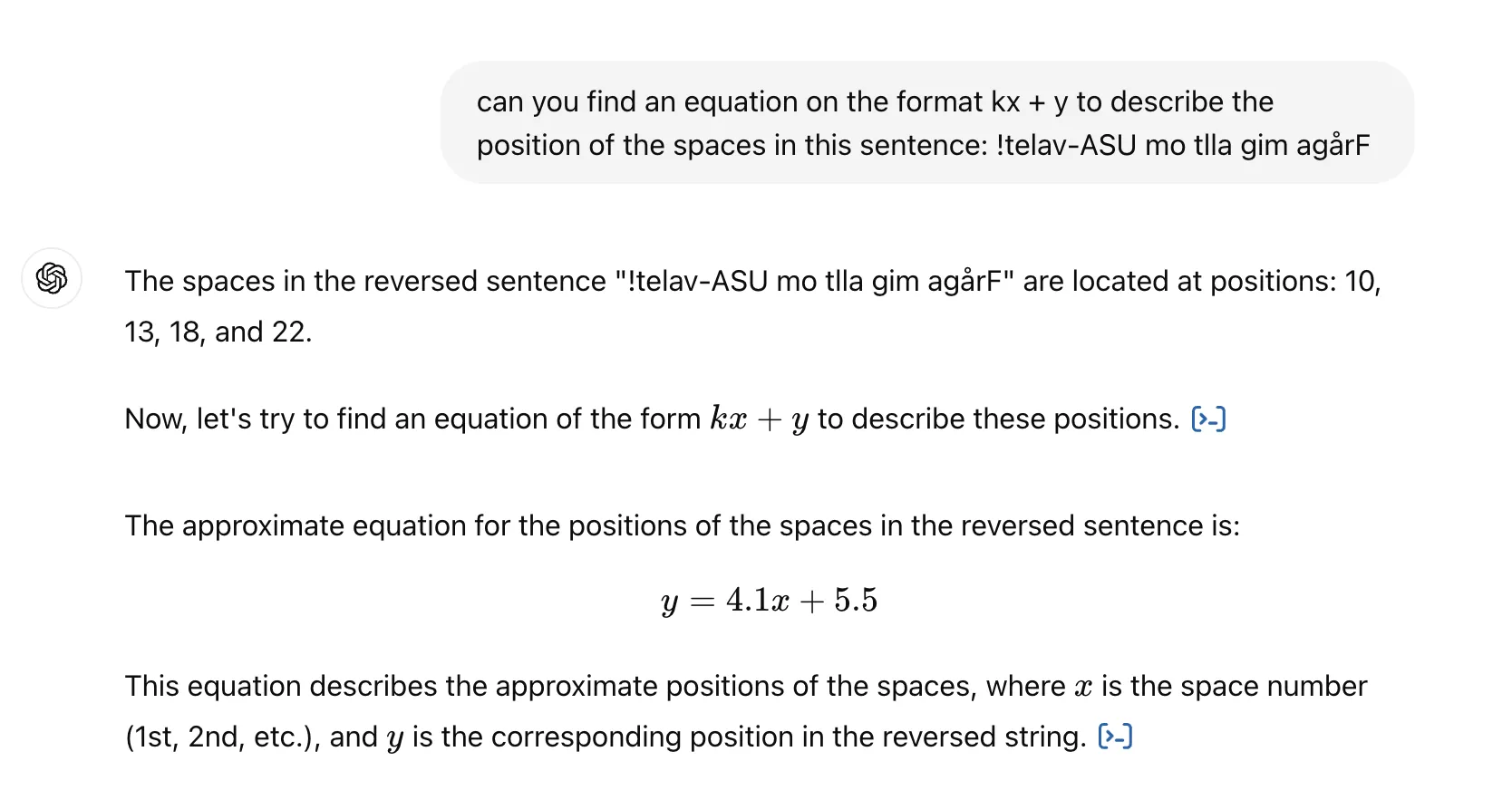
Since we can only use integers in the :nth-child selector, I had to round the numbers like this:
.letter:nth-child(4n + 6) {
  margin-left: 4px;
}
Now we get this:

The solution is not perfect, but I can sense some kind of potential going on here.
Leveraging the power of AI even more
I turned to chatGPT once again, but this time I asked for a more exact equation:
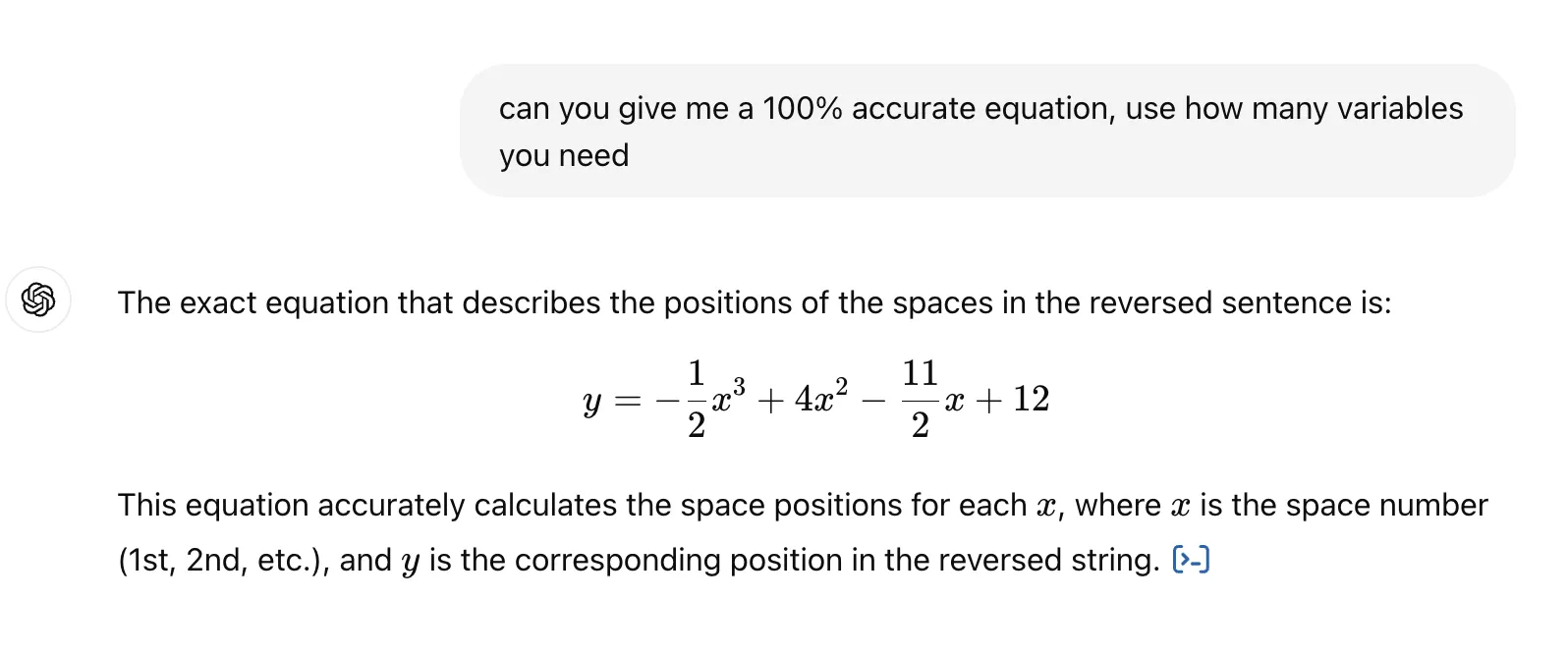
Since we can’t use the :nth-child selector anymore, I had to write a function for it instead:
function calculateSpacePosition(x, i) {
  const spacePosition =
    -0.5 * Math.pow(x, 3) + 4 * Math.pow(x, 2) - 5.5 * x + 12;
  if (i === spacePosition) {
    spaceCount++;
    return true;
  }
  return false;
}
And I apply it to the letter elements like this:
{'Fråga mig allt om USA-valet!'
  .split('')
  .reverse()
  .map((letter, i) => (
    <span
      style={{
        marginLeft: calculateSpacePosition(spaceCount, i) ? '4px' : '0',
      }}
    >
      {letter}
))}
The moment of truth
Get ready for the final result:

Success! The speech bubble tail is facing the character, the letters are in the correct order, and the spaces are where they should be. This was a tricky problem to solve, but well worth the effort.
So, what can we learn from this?
-
Never give up! Even when you don’t know how to solve something, just take one step at a time and hope for the best.
-
Be smart!
-
And last but not least, leverage the power of AI!
Thank you for reading!